
Note
You can download this example as a Jupyter notebook or start it in interactive mode.
Creating Piecewise Linear Constraints#
add_piecewise_formulation links variables through a shared piecewise-linear curve. Pair each variable with its breakpoint values; the solver puts every variable on the same point of the curve at every feasible solution.
m.add_piecewise_formulation(
    (power, [0, 30, 60, 100]),
    (fuel,  [0, 36, 84, 170]),
)
This tutorial walks through the main features of add_piecewise_formulation. For the formulation math see the reference page; for the inequality variant in depth see Creating Piecewise Inequality Bounds.
Roadmap
Getting started — the basic 2-variable equality.
Picking a method —
"auto","sos2","incremental","lp".Disjunctive segments — disconnected operating regions with
segments().Inequality bounds —
<=/>=per-tuple sign.Unit commitment — gating with
active=....N-variable linking — CHP plants and beyond.
Per-entity breakpoints — fleets with different curves.
Specifying with slopes —
linopy.Slopes.
[1]:
import warnings

import matplotlib.pyplot as plt
import pandas as pd
import xarray as xr

import linopy

# Silence the evolving-API warning for cleaner tutorial output.
warnings.filterwarnings("ignore", category=linopy.EvolvingAPIWarning)

time = pd.Index([1, 2, 3], name="time")


def plot_curve(
    bp_x, bp_y, operating_x, operating_y, *, ax=None, xlabel="power", ylabel="fuel"
):
    """PWL curve with solver's operating points overlaid."""
    ax = ax if ax is not None else plt.subplots(figsize=(4.5, 3.5))[1]
    ax.plot(bp_x, bp_y, "o-", color="C0", label="breakpoints")
    ax.plot(operating_x, operating_y, "D", color="C1", ms=10, label="solved", alpha=0.8)
    ax.set(xlabel=xlabel, ylabel=ylabel)
    ax.legend()
    return ax
1. Getting started#
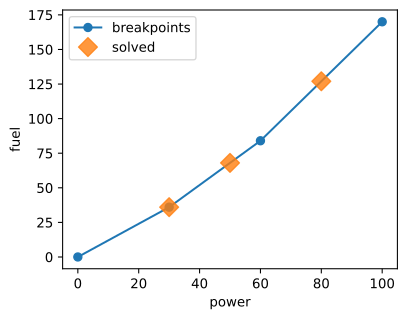
A gas turbine with a convex heat rate. Each (variable, breakpoints) tuple pairs a variable with its breakpoint values. All tuples share interpolation weights, so at any feasible point every variable corresponds to the same point on the curve.
[2]:
demand = xr.DataArray([50, 80, 30], coords=[time])

m = linopy.Model()
power = m.add_variables(name="power", lower=0, upper=100, coords=[time])
fuel = m.add_variables(name="fuel", lower=0, coords=[time])

x_pts = [0, 30, 60, 100]
y_pts = [0, 36, 84, 170]
pwf = m.add_piecewise_formulation((power, x_pts), (fuel, y_pts))
m.add_constraints(power == demand, name="demand")
m.add_objective(fuel.sum())
m.solve(solver_name="highs", reformulate_sos="auto", output_flag=False)

print(pwf)  # inspect the auto-resolved method
m.solution[["power", "fuel"]].to_pandas()
PiecewiseFormulation `pwl0` [time: 3] — incremental, concave
  Variables:
    * pwl0_delta (time, _breakpoint_piece)
    * pwl0_order_binary (time, _breakpoint_piece)
  Constraints:
    * pwl0_delta_bound (time, _breakpoint_piece)
    * pwl0_fill_order (time, _breakpoint_piece)
    * pwl0_binary_order (time, _breakpoint_piece)
    * pwl0_link (_breakpoint, _pwl_var, time)
[2]:
| power | fuel | |
|---|---|---|
| time | ||
| 1 | 50.0 | 68.0 |
| 2 | 80.0 | 127.0 |
| 3 | 30.0 | 36.0 |
[3]:
plot_curve(x_pts, y_pts, m.solution["power"].values, m.solution["fuel"].values);
2. Picking a method#
method="auto" (default) picks the cheapest correct formulation based on sign, curvature and breakpoint layout. The explicit options are "sos2", "incremental", and "lp"; the choice is about cost (auxiliary variables, solver capability), not correctness — on cases where they all apply they give the same optimum.
For now: a quick sanity check that all applicable methods yield the same fuel dispatch on the convex curve from §1.
A full comparison — when each method dispatches, what sign/curvature/breakpoint patterns each requires — lives in §3 (disjunctive), §4 (inequalities), and the reference page’s “Formulation Methods” section.
[4]:
def solve_method(method):
    m = linopy.Model()
    power = m.add_variables(name="power", lower=0, upper=100, coords=[time])
    fuel = m.add_variables(name="fuel", lower=0, coords=[time])
    m.add_piecewise_formulation((power, x_pts), (fuel, y_pts), method=method)
    m.add_constraints(power == demand, name="demand")
    m.add_objective(fuel.sum())
    m.solve(solver_name="highs", reformulate_sos="auto", output_flag=False)
    return m.solution["fuel"].to_pandas()


pd.DataFrame({m: solve_method(m) for m in ["auto", "sos2", "incremental"]})
[4]:
| auto | sos2 | incremental | |
|---|---|---|---|
| time | |||
| 1 | 68.0 | 68.0 | 68.0 |
| 2 | 127.0 | 127.0 | 127.0 |
| 3 | 36.0 | 36.0 | 36.0 |
3. Disjunctive segments — discrete operating bands#
Some equipment has disjoint operating ranges rather than a continuous one. A stepped pump has two speed bands with a forbidden zone between them — the pump physically can’t operate in that gap. segments() models this directly: one segment per band, a binary picks exactly one per operating point.
Below: two pumps in parallel, each with a low band (5–25 m³/h) and a high band (40–100 m³/h). Demands that land in the single-pump gap or above its maximum force the optimiser to combine bands across the two pumps.
(For an on/off gate on a single continuous curve, use active=... instead; see §5.)
[5]:
pumps = pd.Index(["p1", "p2"], name="pump")

m = linopy.Model()
flow = m.add_variables(name="flow", lower=0, upper=100, coords=[pumps, time])
power = m.add_variables(name="power", lower=0, coords=[pumps, time])

# Each pump has two operating bands; the gap between them is a forbidden zone.
m.add_piecewise_formulation(
    (flow, linopy.segments([(5, 25), (40, 100)])),
    (power, linopy.segments([(1, 7), (15, 50)])),
)
m.add_constraints(flow.sum("pump") == xr.DataArray([30, 75, 150], coords=[time]))
m.add_objective(power.sum())
m.solve(solver_name="highs", reformulate_sos="auto", output_flag=False)

# Flat columns: flow_p1, flow_p2, power_p1, power_p2 per timestep.
sol = m.solution[["flow", "power"]].to_dataframe().unstack("pump")
sol.columns = [f"{var}_{p}" for var, p in sol.columns]
sol
[5]:
| flow_p1 | flow_p2 | power_p1 | power_p2 | |
|---|---|---|---|---|
| time | ||||
| 1 | 25.0 | 5.0 | 7.0 | 1.000000 |
| 2 | 25.0 | 50.0 | 7.0 | 20.833333 |
| 3 | 100.0 | 50.0 | 50.0 | 20.833333 |
Every timestep is single-pump-infeasible:
t=1, demand=30: in the single-pump gap (25, 40). Both pumps run in low band, splitting the load.
t=2, demand=75: too much for low+low (max 50), too little for high+high (min 80). The low pump tops out at 25 m³/h; the high pump covers the remaining 50.
t=3, demand=150: above a single pump’s maximum (100). Both pumps run in high band.
4. Inequality bounds — per-tuple sign#
Append a third tuple element ("<=" or ">=") to mark a single expression as bounded by the curve instead of entering as an equality. The 2-variable hypograph (y ≤ f(x)) and epigraph (y ≥ f(x)) are the canonical cases.
On a concave curve with <= (or convex with >=), method="auto" dispatches to a pure LP chord formulation — no binaries, no SOS2.
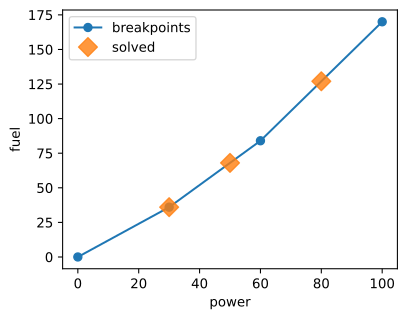
Below: the same heat-rate curve as §1, now read as fuel ≥ f(power) — over-fuelling is admissible but wasteful (the curve is the design minimum), so an objective that minimises fuel pulls the operating point onto the curve. See Creating Piecewise Inequality Bounds for mismatched curvature, auto-dispatch fallbacks, and more geometry.
[6]:
m = linopy.Model()
power = m.add_variables(name="power", lower=0, upper=100, coords=[time])
fuel = m.add_variables(name="fuel", lower=0, coords=[time])

# Same convex heat-rate curve as §1, now bounded with ">="
pwf = m.add_piecewise_formulation(
    (fuel, [0, 36, 84, 170], ">="),  # fuel ≥ f(power) — over-fuelling allowed
    (power, [0, 30, 60, 100]),  # equality role
)
m.add_constraints(power == demand)
m.add_objective(fuel.sum())  # minimise fuel against the lower bound
m.solve(solver_name="highs", reformulate_sos="auto", output_flag=False)

print(f"resolved method={pwf.method}, curvature={pwf.convexity}")
m.solution[["power", "fuel"]].to_pandas()
resolved method=lp, curvature=convex
[6]:
| power | fuel | |
|---|---|---|
| time | ||
| 1 | 50.0 | 68.0 |
| 2 | 80.0 | 127.0 |
| 3 | 30.0 | 36.0 |
[7]:
plot_curve(
    [0, 30, 60, 100],
    [0, 36, 84, 170],
    m.solution["power"].values,
    m.solution["fuel"].values,
);
5. Unit commitment — active#
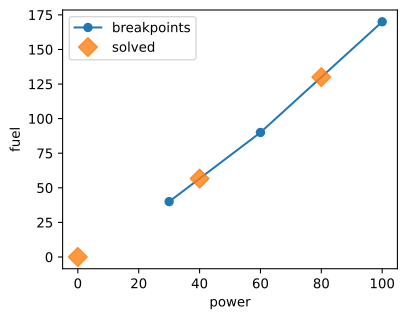
A binary variable gates the whole formulation. active=0 forces the PWL variables (and thus all linked outputs) to zero. Combined with the natural lower=0 on cost/fuel/heat, this gives a clean on/off coupling:
active=1: the unit operates in its full range, outputs tied to the curve.active=0:power = 0,fuel = 0.
[8]:
m = linopy.Model()
p_min, p_max = 30, 100

power = m.add_variables(name="power", lower=0, upper=p_max, coords=[time])
fuel = m.add_variables(name="fuel", lower=0, coords=[time])
backup = m.add_variables(name="backup", lower=0, coords=[time])
commit = m.add_variables(name="commit", binary=True, coords=[time])

x_pts = [p_min, 60, p_max]
y_pts = [40, 90, 170]
m.add_piecewise_formulation(
    (power, x_pts),
    (fuel, y_pts),
    active=commit,
)
# demand below p_min at t=1 — commit must be 0 and backup covers it
m.add_constraints(power + backup == xr.DataArray([15, 80, 40], coords=[time]))
m.add_objective(fuel.sum() + 50 * commit.sum() + 200 * backup.sum())
m.solve(solver_name="highs", reformulate_sos="auto", output_flag=False)
m.solution[["commit", "power", "fuel", "backup"]].to_pandas()
[8]:
| commit | power | fuel | backup | |
|---|---|---|---|---|
| time | ||||
| 1 | 0.0 | 0.0 | 0.000000 | 15.0 |
| 2 | 1.0 | 80.0 | 130.000000 | 0.0 |
| 3 | 1.0 | 40.0 | 56.666667 | 0.0 |
[9]:
plot_curve(x_pts, y_pts, m.solution["power"].values, m.solution["fuel"].values);
6. N-variable linking — CHP plant#
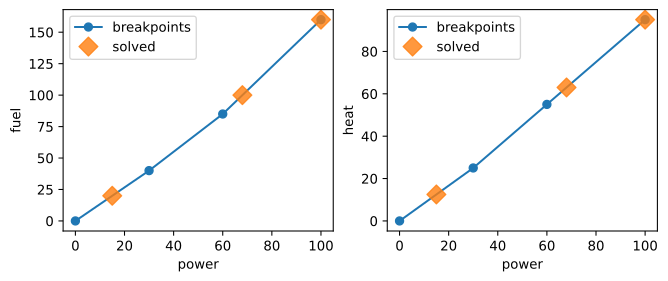
More than two variables can share the same interpolation — useful for combined heat-and-power plants where power, fuel and heat are all functions of a single operating point.
[10]:
m = linopy.Model()
power = m.add_variables(name="power", lower=0, upper=100, coords=[time])
fuel = m.add_variables(name="fuel", lower=0, coords=[time])
heat = m.add_variables(name="heat", lower=0, coords=[time])

x_pts = [0, 30, 60, 100]
y_pts = [0, 40, 85, 160]
z_pts = [0, 25, 55, 95]
m.add_piecewise_formulation(
    (power, x_pts),
    (fuel, y_pts),
    (heat, z_pts),
)
m.add_constraints(fuel == xr.DataArray([20, 100, 160], coords=[time]))
m.add_objective(power.sum())
m.solve(solver_name="highs", reformulate_sos="auto", output_flag=False)
m.solution[["power", "fuel", "heat"]].to_pandas().round(2)
[10]:
| power | fuel | heat | |
|---|---|---|---|
| time | |||
| 1 | 15.0 | 20.0 | 12.5 |
| 2 | 68.0 | 100.0 | 63.0 |
| 3 | 100.0 | 160.0 | 95.0 |
[11]:
fig, axes = plt.subplots(1, 2, figsize=(8, 3))
plot_curve(
    x_pts, y_pts, m.solution["power"].values, m.solution["fuel"].values, ax=axes[0]
)
plot_curve(
    x_pts,
    z_pts,
    m.solution["power"].values,
    m.solution["heat"].values,
    ylabel="heat",
    ax=axes[1],
);
7. Per-entity breakpoints — a fleet of generators#
Pass a dict to breakpoints() with entity names as keys for different curves per entity. Ragged lengths are NaN-padded automatically, and breakpoints broadcast over any remaining dimensions (here, time).
[12]:
gens = pd.Index(["gas", "coal"], name="gen")
x_gen = linopy.breakpoints(
    {"gas": [0, 30, 60, 100], "coal": [0, 50, 100, 150]}, dim="gen"
)
y_gen = linopy.breakpoints(
    {"gas": [0, 40, 90, 180], "coal": [0, 55, 130, 225]}, dim="gen"
)

m = linopy.Model()
power = m.add_variables(name="power", lower=0, upper=150, coords=[gens, time])
fuel = m.add_variables(name="fuel", lower=0, coords=[gens, time])
m.add_piecewise_formulation((power, x_gen), (fuel, y_gen))
m.add_constraints(power.sum("gen") == xr.DataArray([80, 120, 50], coords=[time]))
m.add_objective(fuel.sum())
m.solve(solver_name="highs", reformulate_sos="auto", output_flag=False)
m.solution[["power", "fuel"]].to_dataframe()
[12]:
| power | fuel | ||
|---|---|---|---|
| gen | time | ||
| gas | 1 | 30.0 | 40.0 |
| 2 | 30.0 | 40.0 | |
| 3 | 0.0 | 0.0 | |
| coal | 1 | 50.0 | 55.0 |
| 2 | 90.0 | 115.0 | |
| 3 | 50.0 | 55.0 |
8. Specifying with slopes — Slopes#
When marginal costs (slopes) are more natural than absolute y-values, wrap them in linopy.Slopes. The x grid is borrowed from the sibling tuple — no need to repeat it. Same curve as section 1:
[13]:
m = linopy.Model()
power = m.add_variables(name="power", lower=0, upper=100, coords=[time])
fuel = m.add_variables(name="fuel", lower=0, coords=[time])

m.add_piecewise_formulation(
    (power, [0, 30, 60, 100]),
    (fuel, linopy.Slopes([1.2, 1.6, 2.15], y0=0)),
)
m.add_constraints(power == demand, name="demand")
m.add_objective(fuel.sum())
m.solve(solver_name="highs", reformulate_sos="auto", output_flag=False)

m.solution[["power", "fuel"]].to_pandas()
[13]:
| power | fuel | |
|---|---|---|
| time | ||
| 1 | 50.0 | 68.0 |
| 2 | 80.0 | 127.0 |
| 3 | 30.0 | 36.0 |
When to use what#
Pattern |
API |
|---|---|
|
|
|
|
Disconnected operating regions |
|
Unit on/off coupling |
|
Multiple synchronized outputs (e.g. CHP) |
3+ tuples, all |
Different curves per entity |
|
Slopes more natural than absolute y-values |
|
For the formulation math, see the reference page. For inequality bounds in depth, see Creating Piecewise Inequality Bounds.